About 4.Do - Task, To do, Goal list
Boost Your Productivity with 4.Do - The Eisenhower Matrix Task Organizer Tired of feeling overwhelmed? Struggling to decide what to work on first? 4.Do helps you focus on what truly matters with the Eisenhower Matrix, the...
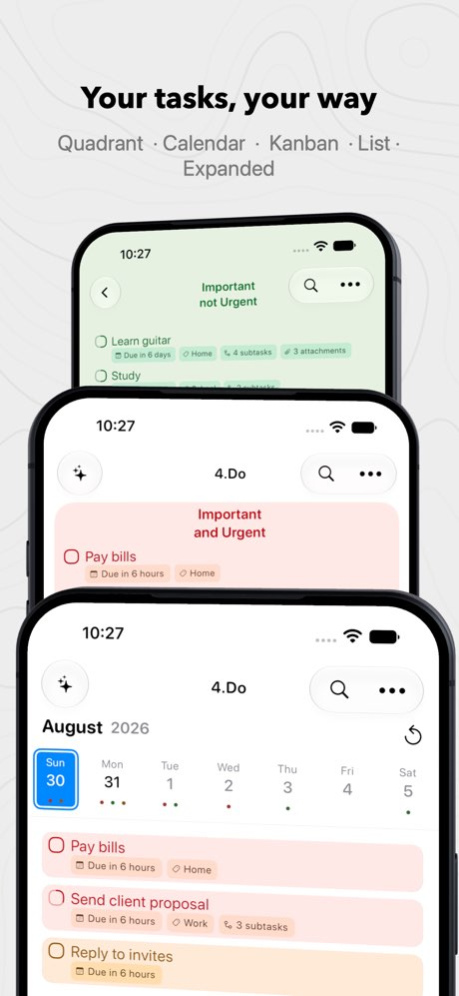
Boost Your Productivity with 4.Do - The Eisenhower Matrix Task Organizer Tired of feeling overwhelmed? Struggling to decide what to work on first? 4.Do helps you focus on what truly matters with the Eisenhower Matrix, the prioritization method featured in Dr. Stephen R. Covey's The 7 Habits of Highly Effective People. 4.Do is your checklist and task management tool, empowering you to organize, prioritize, and tackle goals with ease. Not sure which quadrant a task belongs in? Let on-device AI suggest it. Capture tasks by voice, from a photo, with Siri, or straight from a notification, then see your week at a glance in Calendar view. With 4.Do Cloud, everything stays in sync across iPhone, iPad, Mac, and other platforms. Key Features 4-Quadrant Matrix: Visualize and prioritize tasks by urgency and importance. On-Device AI Suggestions: Type a task and 4.Do recommends which quadrant it belongs in. Runs entirely on your device, so your tasks never leave it. Capture Anywhere: Add tasks by voice, scan them from a photo or screenshot, or use Quick-Add right from a notification. Siri & Spotlight: Add, find, and complete tasks by voice or from your home screen search. Calendar View: See your tasks grouped by due date so nothing sneaks up on you. 4.Do Cloud: Sync across all your Apple devices and other platforms. Focused Mode: Zoom in on a single quadrant to work without distraction. Subtasks & Checklists: Break projects into actionable steps and track progress. Reminders & Recurring Tasks: Stay ahead of deadlines and build lasting habits. Smart Search: Fuzzy matching finds your task even if you misspell it. Filters & Sorting: Organize your to-do list by priority, due date, or custom tags. Attachments: Add photos for context. Collaboration: Share lists and tasks with others. Make It Yours: Rename quadrants, choose color tones, adjust contrast, pick empty-state animations, and add widgets. Your Productivity, Simplified Whether you're tackling errands, managing a checklist, planning long-term goals, or building daily habits, 4.Do keeps you focused and efficient, helping you achieve more in less time while staying aligned with your priorities. Start Today Download 4.Do and take control of your tasks, time, and goals. 4.Do is free, with a Premium upgrade for full access to all features. Subscription plans: - Monthly - $4.99/month - Yearly - $29.99/year The subscription automatically renews unless auto-renewal is turned off at least 24 hours before the end of the current period. Payment will be charged to your iTunes account at confirmation of purchase. Account will be charged for renewal within 24 hours of the end of the current period, and the cost of the renewal will be provided. Subscriptions may be managed by the user. Auto-renewal may be turned off by going to the user's Account Settings after purchase. No cancellation of the current subscription is allowed during active subscription period. Any unused portion of a free trial period, if offered, will be forfeited when the user purchases a subscription to that publication. For more information: Terms of Use - https://www.4do.app/about/termsandconditions/ios Privacy Policy - https://www.4do.app/about/privacy-policies/ios
Version History 4.Do Cloud — Sync your tasks between iOS and other platforms. Calendar view — See your tasks grouped by due date. Siri integration — Add and check off tasks by voice. Spotlight integration — Find and open tasks from your home screen search. Fuzzy search — Misspell it and you'll still find it. Color tones — Choose a color style for each quadrant to give them more personality. Contrast slider — Dial quadrant contrast up or down. Refreshed color scheme — Better contrast and readability throughout. More empty-view animations — New animation choices when a quadrant is clear. 2.3.0.2 Sep 15 Apple Reminders integration Quick Add Long-press the “+” button to open Quick Add, where you can: • Use the camera to capture text and create tasks • Create tasks from photos in your library • Speak to add tasks Quick Subtask Add On the Add Task screen, try the new subtask options: • Use the camera to capture text and create subtasks • Create subtasks from photos in your library • Speak to add subtasks Add Assist (Natural Language) On the Add Task screen, type or dictate something like “Call mom tomorrow morning.” The app should suggest a due date, due time, and relevant tags—tap any suggestion to apply it to the task. A.I. Features • Quadrant Suggestions: Recommends the best quadrant for each task • Subtask Suggestions: Generates clear, actionable subtasks for a task 2.1.4 Feb 19 - Redesigned for IOS26 and Liquid Glass - Added Kanban View - Added user option for when to auto-advance tasks to urgent quadrants - Added app wide accent color option 2.0.2 12/19/2025 - Redesigned for IOS26 and Liquid Glass - Added Kanban View - Added user option for when to auto-advance tasks to urgent quadrants - Added app wide accent color option 2.0.1 12/18/2025 Changes made for V2.0: - Redesigned for IOS26 and Liquid Glass - Added Kanban View - Added user option for when to auto-advance tasks to urgent quadrants - Added app which accent color option 2.0 12/18/2025 More Bug fixes 1.0.24 05/21/2025 Bug fixes. 1.0.23 05/14/2025 Fixed bug causing freezes when adding subtasks. 1.0.22 04/22/2025 Fixed review request bug. 1.0.21 04/22/2025 Fixed review request bug. 1.0.20 04/21/2025 Add animated empty view option in quadrant view. 1.0.19 04/20/2025 Minor visual updates and bug fixes. 1.0.18 04/12/2025 Minor visual updates and bug fixes. 1.0.17 04/07/2025 Minor translation updates. 1.0.15 04/03/2025 Initial release!!! 1.0.14 03/25/2025 Initial release!!! 1.0.11 03/24/2025 Initial release!!! 1.0.4 03/05/2025 Initial release!!! 1.0.3 02/06/2025 1.0.1 02/03/2025
Previous Versions
Here you can find the changelog of 4.Do - Task, To do, Goal list since it was posted on our website on 2026-02-17 03:44:38.
The latest version is 2.3.0.2 and it was updated on 2026-10-07 02:16:57. See below the changes in each version.
4.Do - Task, To do, Goal list version 2.3.0.2
Updated At: 2026-10-06
Changes: Version History 4.Do Cloud — Sync your tasks between iOS and other platforms.
Calendar view — See your tasks grouped by due date.
Siri integration — Add and check off tasks by voice.
Spotlight integration — Find and open tasks from your home screen search.
Fuzzy search — Misspell it and you'll still find it.
Color tones — Choose a color style for each quadrant to give them more personality.
Contrast slider — Dial quadrant contrast up or down.
Refreshed color scheme — Better contrast and readability throughout.
More empty-view animations — New animation choices when a quadrant is clear. 2.3.0.2 Sep 15 Apple Reminders integration
Quick Add
Long-press the “+” button to open Quick Add, where you can:
• Use the camera to capture text and create tasks
• Create tasks from photos in your library
• Speak to add tasks
Quick Subtask Add
On the Add Task screen, try the new subtask options:
• Use the camera to capture text and create subtasks
• Create subtasks from photos in your library
• Speak to add subtasks
Add Assist (Natural Language)
On the Add Task screen, type or dictate something like “Call mom tomorrow morning.”
The app should suggest a due date, due time, and relevant tags—tap any suggestion to apply it to the task.
A.I. Features
• Quadrant Suggestions: Recommends the best quadrant for each task
• Subtask Suggestions: Generates clear, actionable subtasks for a task 2.1.4 Feb 19 - Redesigned for IOS26 and Liquid Glass
- Added Kanban View
- Added user option for when to auto-advance tasks to urgent quadrants
- Added app wide accent color option 2.0.2 12/19/2025 - Redesigned for IOS26 and Liquid Glass
- Added Kanban View
- Added user option for when to auto-advance tasks to urgent quadrants
- Added app wide accent color option 2.0.1 12/18/2025 Changes made for V2.0:
- Redesigned for IOS26 and Liquid Glass
- Added Kanban View
- Added user option for when to auto-advance tasks to urgent quadrants
- Added app which accent color option 2.0 12/18/2025 More Bug fixes 1.0.24 05/21/2025 Bug fixes. 1.0.23 05/14/2025 Fixed bug causing freezes when adding subtasks. 1.0.22 04/22/2025 Fixed review request bug. 1.0.21 04/22/2025 Fixed review request bug. 1.0.20 04/21/2025 Add animated empty view option in quadrant view. 1.0.19 04/20/2025 Minor visual updates and bug fixes. 1.0.18 04/12/2025 Minor visual updates and bug fixes. 1.0.17 04/07/2025 Minor translation updates. 1.0.15 04/03/2025 Initial release!!! 1.0.14 03/25/2025 Initial release!!! 1.0.11 03/24/2025 Initial release!!! 1.0.4 03/05/2025 Initial release!!! 1.0.3 02/06/2025 1.0.1 02/03/2025
4.Do - Task, To do, Goal list version 2.3.0.2
Updated At: 2026-09-18
Changes: Version History 4.Do Cloud — Sync your tasks between iOS and other platforms.
Calendar view — See your tasks grouped by due date.
Siri integration — Add and check off tasks by voice.
Spotlight integration — Find and open tasks from your home screen search.
Fuzzy search — Misspell it and you'll still find it.
Color tones — Choose a color style for each quadrant to give them more personality.
Contrast slider — Dial quadrant contrast up or down.
Refreshed color scheme — Better contrast and readability throughout.
More empty-view animations — New animation choices when a quadrant is clear. 2.3.0.2 3d ago Apple Reminders integration
Quick Add
Long-press the “+” button to open Quick Add, where you can:
• Use the camera to capture text and create tasks
• Create tasks from photos in your library
• Speak to add tasks
Quick Subtask Add
On the Add Task screen, try the new subtask options:
• Use the camera to capture text and create subtasks
• Create subtasks from photos in your library
• Speak to add subtasks
Add Assist (Natural Language)
On the Add Task screen, type or dictate something like “Call mom tomorrow morning.”
The app should suggest a due date, due time, and relevant tags—tap any suggestion to apply it to the task.
A.I. Features
• Quadrant Suggestions: Recommends the best quadrant for each task
• Subtask Suggestions: Generates clear, actionable subtasks for a task 2.1.4 Feb 19 - Redesigned for IOS26 and Liquid Glass
- Added Kanban View
- Added user option for when to auto-advance tasks to urgent quadrants
- Added app wide accent color option 2.0.2 12/19/2025 - Redesigned for IOS26 and Liquid Glass
- Added Kanban View
- Added user option for when to auto-advance tasks to urgent quadrants
- Added app wide accent color option 2.0.1 12/18/2025 Changes made for V2.0:
- Redesigned for IOS26 and Liquid Glass
- Added Kanban View
- Added user option for when to auto-advance tasks to urgent quadrants
- Added app which accent color option 2.0 12/18/2025 More Bug fixes 1.0.24 05/21/2025 Bug fixes. 1.0.23 05/14/2025 Fixed bug causing freezes when adding subtasks. 1.0.22 04/22/2025 Fixed review request bug. 1.0.21 04/22/2025 Fixed review request bug. 1.0.20 04/21/2025 Add animated empty view option in quadrant view. 1.0.19 04/20/2025 Minor visual updates and bug fixes. 1.0.18 04/12/2025 Minor visual updates and bug fixes. 1.0.17 04/07/2025 Minor translation updates. 1.0.15 04/03/2025 Initial release!!! 1.0.14 03/25/2025 Initial release!!! 1.0.11 03/24/2025 Initial release!!! 1.0.4 03/05/2025 Initial release!!! 1.0.3 02/06/2025 1.0.1 02/03/2025
4.Do - Task, To do, Goal list version 2.1.4
Updated At: 2026-09-11
Changes: Version History Apple Reminders integration
Quick Add
Long-press the “+” button to open Quick Add, where you can:
• Use the camera to capture text and create tasks
• Create tasks from photos in your library
• Speak to add tasks
Quick Subtask Add
On the Add Task screen, try the new subtask options:
• Use the camera to capture text and create subtasks
• Create subtasks from photos in your library
• Speak to add subtasks
Add Assist (Natural Language)
On the Add Task screen, type or dictate something like “Call mom tomorrow morning.”
The app should suggest a due date, due time, and relevant tags—tap any suggestion to apply it to the task.
A.I. Features
• Quadrant Suggestions: Recommends the best quadrant for each task
• Subtask Suggestions: Generates clear, actionable subtasks for a task 2.1.4 Feb 19 - Redesigned for IOS26 and Liquid Glass
- Added Kanban View
- Added user option for when to auto-advance tasks to urgent quadrants
- Added app wide accent color option 2.0.2 12/19/2025 - Redesigned for IOS26 and Liquid Glass
- Added Kanban View
- Added user option for when to auto-advance tasks to urgent quadrants
- Added app wide accent color option 2.0.1 12/18/2025 Changes made for V2.0:
- Redesigned for IOS26 and Liquid Glass
- Added Kanban View
- Added user option for when to auto-advance tasks to urgent quadrants
- Added app which accent color option 2.0 12/18/2025 More Bug fixes 1.0.24 05/21/2025 Bug fixes. 1.0.23 05/14/2025 Fixed bug causing freezes when adding subtasks. 1.0.22 04/22/2025 Fixed review request bug. 1.0.21 04/22/2025 Fixed review request bug. 1.0.20 04/21/2025 Add animated empty view option in quadrant view. 1.0.19 04/20/2025 Minor visual updates and bug fixes. 1.0.18 04/12/2025 Minor visual updates and bug fixes. 1.0.17 04/07/2025 Minor translation updates. 1.0.15 04/03/2025 Initial release!!! 1.0.14 03/25/2025 Initial release!!! 1.0.11 03/24/2025 Initial release!!! 1.0.4 03/05/2025 Initial release!!! 1.0.3 02/06/2025 1.0.1 02/03/2025
4.Do - Task, To do, Goal list version 2.1.4
Updated At: 2026-02-19
Changes: Apple Reminders integration
Quick Add
Long-press the “+” button to open Quick Add, where you can:
• Use the camera to capture text and create tasks
• Create tasks from photos in your library
• Speak to add tasks
Quick Subtask Add
On the Add Task screen, try the new subtask options:
• Use the camera to capture text and create subtasks
• Create subtasks from photos in your library
• Speak to add subtasks
Add Assist (Natural Language)
On the Add Task screen, type or dictate something like “Call mom tomorrow morning.”
The app should suggest a due date, due time, and relevant tags—tap any suggestion to apply it to the task.
A.I. Features
• Quadrant Suggestions: Recommends the best quadrant for each task
• Subtask Suggestions: Generates clear, actionable subtasks for a task
4.Do - Task, To do, Goal list version 2.0.2
Updated At: 2025-12-19
Changes: - Redesigned for IOS26 and Liquid Glass
- Added Kanban View
- Added user option for when to auto-advance tasks to urgent quadrants
- Added app wide accent color option
Disclaimer
Official App Store Link
We do not host 4.Do - Task, To do, Goal list on our servers. We did not scan it for viruses, adware, spyware or other type of malware. This app is hosted by Apple and passed their terms and conditions to be listed there. We recommend caution when installing it.
The App Store link for 4.Do - Task, To do, Goal list is provided to you by apps112.com without any warranties, representations or guarantees of any kind, so access it at your own risk.
If you have questions regarding this particular app contact the publisher directly. For questions about the functionalities of apps112.com contact us.